Photobooth: Distribution moved to Flathub
For a long time I packaged the Photobooth as a custom Yocto image. Yocto provided the control I needed for dedicated hardware, but maintaining an entire Linux distribution for a single application became a heavy burden—especially when adding features like YOLO v11 background removal with its complex Python dependencies.
Why the Switch?
The main reasons for moving to Flathub:
Scope reduction: With Yocto I had to manage the whole operating system—kernel versions, device trees, distro recipes, cross-compiled libraries. With Flatpak I only package the app and its direct dependencies. Many libraries are already available as prebuilt runtimes.
Build efficiency: Yocto builds took about four hours on my laptop. Flatpak builds are noticeably faster, and GitHub Actions CI lets me build test Flatpaks in pull requests for quick testing on different machines.
Dependency management: Managing dependencies in Yocto was cumbersome—I had to write recipes for build-time tools like Python. With Flatpak, build dependencies like Python are easy to include in the build environment, and they don’t bloat the final runtime image. This is especially useful for complex builds like libcamera that require Python during compilation.
System maintenance: Keeping track with the current version of Yocto took considerable effort. Much of the testing work focused on validating the system itself rather than the application. The Yocto image had to be built and tested separately for each Raspberry Pi variant, and achieving real stability would have required significantly more work.
Stable operating system: The Raspberry Pi ecosystem has evolved significantly since I started developing Photobooth. Early versions lacked essential features and relied on outdated software. Flatpak enables managing application dependencies independently while running a stable base OS. With Yocto, I struggled to get CUPS and Gutenprint working properly, forcing workarounds like sending image data directly over Wi-Fi to the Canon Selphy printer. Flatpak eliminates these constraints.
Qt lifecycle: Yocto still relied on Qt5, which is moving out of support. The transition to Flathub forced a port to Qt6, which was overdue anyway.
Qt6 Migration Challenges
Porting to Qt6 broke existing gphoto2 camera support—Qt6 doesn’t support the Qt Multimedia plugin system the same way. I reimplemented camera input directly using QVideoFrameInput to feed gphoto2 frames into Qt’s pipeline. This and other refactoring during the port resulted in simpler, more maintainable code.
YOLOv11 Integration
The background removal feature leverages YOLOv11 image segmentation for precise subject isolation. To maximize performance and memory usage, I implemented the inference engine directly in C++ using NCNN and ONNX runtimes, allowing the user to select the faster backend depending on the target architecture. The live preview uses the lightweight nano model to maintain real-time performance, while final processed images use the refined extra large model for superior quality. The preview runs at real-time speeds even on a Raspberry Pi 5, making the feature practical for kiosk deployments.
Packaging Hurdles
Network isolation: Flathub’s build workers are completely isolated from the internet for security and reproducibility. While my own CI runners could access the network during builds, Flathub required all dependencies to be pre-downloaded. Python packages had to be cached and installed offline, and some libraries that fetched dependencies during compilation needed manual resolution.
Model preparation: The YOLOv11 models require export to NCNN and ONNX formats, a process that typically downloads dependencies from the internet. Since this couldn’t be done during the Flatpak build, I set up a separate pipeline to pre-export the models, then bundled those prepared artifacts into the final package.
Metadata: Getting Flatpak metadata right was challenging. Documentation is fragmented, and full validation only happens in Flathub’s distribution repository CI. I had to iterate using PR-built artifacts to catch validation issues.
Conclusion
Yocto remains valuable for appliance-style deployments requiring tight hardware control, enabling purpose-built devices with fine-grained system configuration. For general application distribution, however, Flathub offers clear advantages: reduced maintenance overhead, faster development cycles, and seamless cross-distribution compatibility.
Installation
Getting started with Photobooth on Flathub is straightforward. First, install the flatpak helper on your system:
sudo apt install flatpak
Then install the application directly from Flathub:
flatpak install flathub io.github.saeugetier.photobooth
That’s it—no complex setup or dependency management needed.
Current state
Here’s a video showcasing the current features of Photobooth:
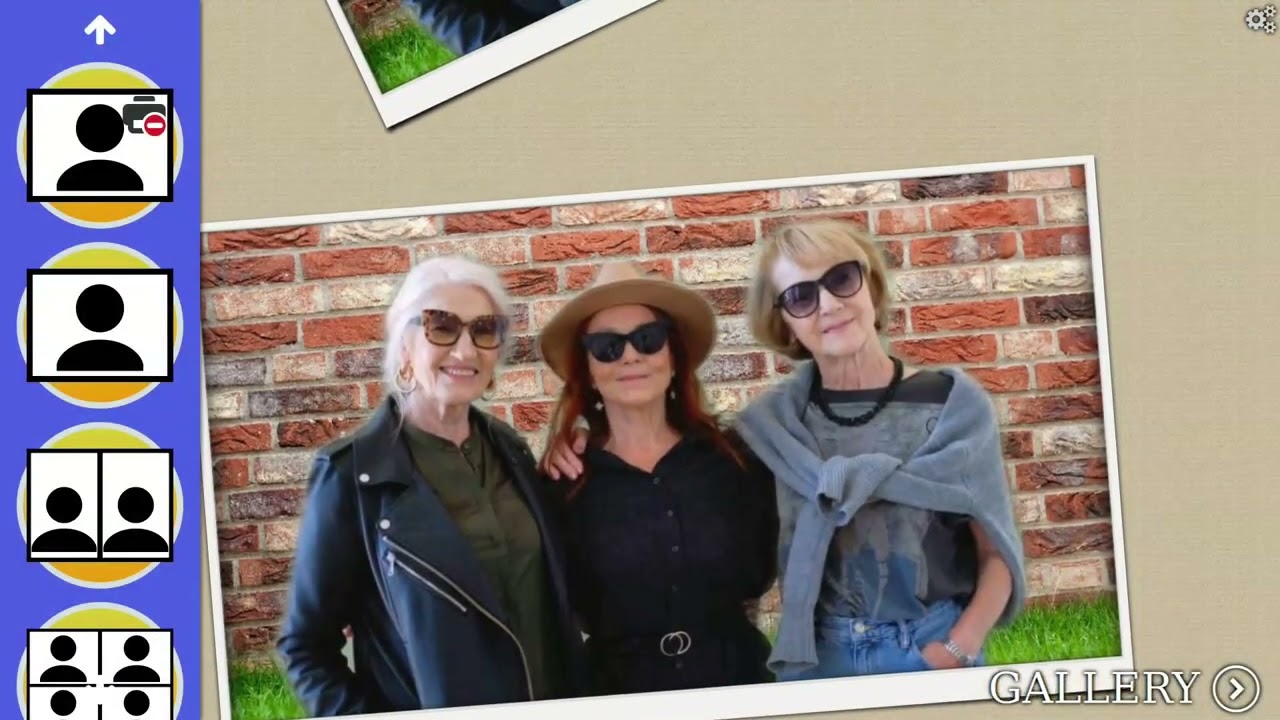
Features:
- Intuitive, touch-friendly user interface designed for kiosk use.
- Capture photos via a camera. USB camera (V4L2) and GPhoto2 cameras are supported. Libcamera (for Raspberry Pi Camera) support will come.
- Create collage from captured photos. Collage templates are customizable (see documentation)
- Print single photos or collages
- View and reprint captures in a gallery
- Background removal via neural network or green screen.
- Selectable image filter effects
Further links
Check out the app on Flathub: https://flathub.org/de/apps/io.github.saeugetier.photobooth